
JSON Output
The JSON format is GraphScribe's complete, structured dump, every collected node, pin, edge, variable, class reference, and diagnostic, in machine-readable form. It's the format to use when you're building your own tooling on top of GraphScribe, and the fallback for full values when Markdown truncates long ones.
It's verbose and not meant to be read by people, for reading use Markdown, for diagrams Mermaid, for cross-asset AI linkage Graphify.
Version stamps
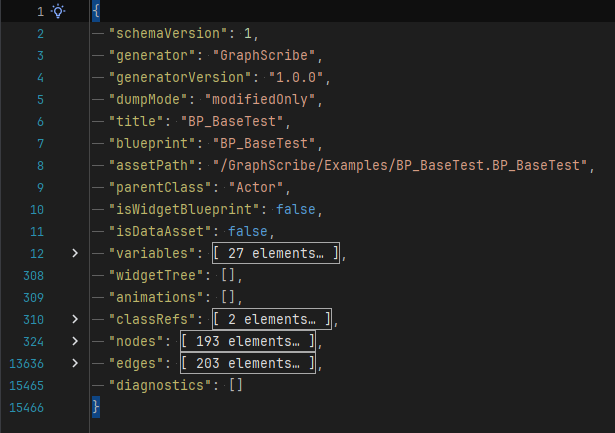
Every JSON document carries identity fields at its root so consumers can detect format drift:
json
{
  "schemaVersion": 1,
  "generator": "GraphScribe",
  "generatorVersion": "1.0.0",
  "dumpMode": "modifiedOnly",
  ...
}| Field | Meaning |
|---|---|
schemaVersion | Shape of the JSON IR (currently 1), see Schema & Stability |
generator | Always "GraphScribe" |
generatorVersion | Plugin version that produced the file (kept in sync with VersionName in GraphScribe.uplugin) |
dumpMode | Optional, the property dump mode used: full, modifiedOnly, or blueprintOnly |
Root fields
| Field | Type | Content |
|---|---|---|
title | string | Document title (selection exports append (selection)) |
blueprint | string | Asset object name, e.g. BP_BaseTest |
assetPath | string | Asset package path, e.g. /GraphScribe/Examples/BP_BaseTest.BP_BaseTest |
parentClass | string | Immediate parent class name |
isWidgetBlueprint | bool | True for Widget Blueprints |
isDataAsset | bool | True for DataAssets (no graphs, property dump only) |
variables | array | All variable rows (see below) |
widgetTree | array | Widget Blueprint hierarchy lines |
animations | array | Widget Blueprint animation names |
classRefs | array | Class references from CDO / DataAsset property walks |
nodes | array | Every graph node with its pins |
edges | array | Pin-to-pin edges (reroute-collapsed, labeled) |
diagnostics | array | Structured diagnostics, see Diagnostics Codes |
Variables
Each variable row carries its name, type, default, origin, and hierarchy info:
json
{
  "name": "Base_Bool",
  "typeKind": "bool",
  "typeLabel": "bool",
  "defaultValue": "True",
  "isDelegate": false,
  "origin": "blueprint",
  "hasChildren": false,
  "declaringClass": "BP_BaseTest"
}originis one ofblueprint,reflected,inherited, orcomponent.hasChildrenis true for container/struct anchors, child rows use dotted/indexed names likePrimaryActorTick.bStartWithTickEnabled.- Optional fields:
category(variable category path),component(owning component forcomponentrows), anddelegateParams(signature params for delegates). - JSON always keeps the full value, long values are never truncated here (unlike the Markdown display).
Nodes, pins, and edges
Each node includes its class, label, graph, position, callee info (for function calls), and every pin:
json
{
  "id": "EventGraph::73C2527F44995EED3AC8E283B6433395",
  "class": "K2Node_AsyncAction",
  "label": "Async Load Game from Slot",
  "graph": "EventGraph",
  "colorClass": "n_call",
  "posX": 208,
  "posY": 0,
  "omit": false,
  "latent": true,
  "calleeOwnerName": "",
  "calleeOwnerPath": "",
  "calleeFunctionName": "",
  "isBlueprintCallee": false,
  "definesFunction": false,
  "annotations": [
    "latent",
    "SlotName=Slot"
  ],
  "pins": [
    {
      "name": "execute",
      "friendlyName": "execute",
      "output": false,
      "exec": true,
      "hidden": false,
      "category": "exec",
      "subCategory": "None",
      "subObject": "",
      "defaultValue": ""
    },
    {
      "name": "SlotName",
      "friendlyName": "SlotName",
      "output": false,
      "exec": false,
      "hidden": false,
      "category": "string",
      "subCategory": "None",
      "subObject": "",
      "defaultValue": "Slot"
    }
  ]
}
Edges reference nodes by id and carry the connected pins plus a type label:
json
{
  "from": "EventGraph::EDCA6CDA4CAE963FD9B7F28AF3844BA8",
  "to": "EventGraph::73C2527F44995EED3AC8E283B6433395",
  "fromPin": "then",
  "toPin": "execute",
  "label": "",
  "exec": true,
  "colorKind": "exec"
}
exec: truemarks execution-flow edges,colorKindis the edge type token (exec,struct,actor, ...).omit: truenodes are excluded from the display emitters (Markdown/Mermaid) but still present here for tooling.
Selection exports
A selection export produces the same root shape but contains only the selected nodes (plus the owning function's entry), with empty variables / widgetTree / classRefs, and a collect.selection_snippet info diagnostic.
Example
The full document below is the real BP_BaseSaveTest.json from the example content shipped with the plugin.
json
{
  "schemaVersion": 1,
  "generator": "GraphScribe",
  "generatorVersion": "1.0.0",
  "dumpMode": "modifiedOnly",
  "title": "BP_BaseSaveTest",
  "blueprint": "BP_BaseSaveTest",
  "assetPath": "/GraphScribe/Examples/Data/BP_BaseSaveTest.BP_BaseSaveTest",
  "parentClass": "SaveGame",
  "isWidgetBlueprint": false,
  "isDataAsset": false,
  "variables": [
    {
      "name": "bSaved",
      "typeKind": "bool",
      "typeLabel": "bool",
      "defaultValue": "False",
      "isDelegate": false,
      "origin": "blueprint",
      "hasChildren": false,
      "declaringClass": "BP_BaseSaveTest"
    }
  ],
  "widgetTree": [],
  "animations": [],
  "classRefs": [],
  "nodes": [],
  "edges": [],
  "diagnostics": [
    {
      "code": "collect.empty_graph",
      "severity": "info",
      "message": "No graph nodes found on this Blueprint.",
      "nodeId": "bp:/GraphScribe/Examples/Data/BP_BaseSaveTest.BP_BaseSaveTest"
    }
  ]
}
Where files go
A JSON export saves as <AssetName>.json (selection exports as <AssetName>_<GraphName>.json) via Save As..., or per asset under the mirrored folder structure in a batch run. The save location follows the same rules as every other format.
For the machine contract details (versioning, when fields change, stability guarantees), see Schema & Stability.